Tuesday, 7 October 2025

Microsoft Copilot: The AI Companion That Changed Everything


Microsoft Copilot: The AI Companion That Changed Everything

 Copilot Microsoft's digital clutch


From a humble chatbot to a cross-platform creative force, Microsoft
Copilot has redefined how humans interact with machines - turning
productivity into poetry, and search into soulful collaboration.


Origination of Copilot:
Bing Chat and the Spark of a New Era

The story of Microsoft Copilot begins in February 2023, when Microsoft unveiled Bing Chat, a conversational AI built on OpenAI’s GPT-4 and enhanced by Microsoft’s proprietary Prometheus model.

This wasn’t just another chatbot—it was a fusion of cutting-edge language understanding and real-time web search, designed to answer questions, generate content, and assist users in natural language.

Bing Chat was embedded into Microsoft Bing and the Edge browser, offering users a new way to explore the web. It could summarize articles, write poems, generate code, and even help with travel planning—all through a simple chat interface


Rebranding: From Bing Chat to Microsoft Copilot


As Bing Chat gained traction, Microsoft saw a bigger opportunity: to unify its AI offerings under a single, powerful brand. Thus, in November 2023, Bing Chat was officially rebranded as Microsoft Copilot.

This wasn’t just a name change—it was a philosophical shift. Copilot wasn’t just for search anymore. It was becoming a cross-platform assistant, embedded in Windows, Office, and the web, designed to help users write, create, analyze, and strategize.


Microsoft 365 Copilot: AI Meets Productivity

One of the most transformative moments came in March 2023, when Microsoft announced Copilot for Microsoft 365. This integration brought AI directly into the tools billions of people use every day:

Word: Copilot could draft, rewrite, and summarize documents

Excel: It could analyze data, generate formulas, and create visualizations

PowerPoint: It could design slides, suggest layouts, and generate speaker notes

Outlook: It could summarize emails, suggest replies, and schedule meetings

Teams: It could recap meetings, generate action items, and assist with collaboration

This wasn’t just automation—it was augmentation. Copilot became a creative partner, helping users express ideas faster, clearer, and more beautifully.


Enterprise Rollout and Pricing

In July 2023, Microsoft revealed the pricing for Microsoft 365 Copilot: $30 per user per month for enterprise customers. 

While some balked at the cost, many saw it as a worthwhile investment—especially for teams looking to boost productivity and reduce manual work.

By November 2023, Copilot was officially available to enterprise customers, and adoption began to surge across industries—from law firms and marketing agencies to hospitals and universities


Windows Copilot: AI in the Operating System

In October 2023, Microsoft introduced Windows Copilot, embedding AI directly into Windows 11. Accessible via a sidebar, Windows Copilot could:
Adjust system settings
Launch apps
Summarize documents
Answer questions
Perform tasks across the OS

This marked a major shift: Copilot was no longer just a productivity tool—it was becoming a core part of the user interface, guiding users through their digital lives.


Copilot for Security and Developer Tools


In 2024, Microsoft expanded Copilot into specialized domains:
Copilot for Security: Announced in April 2024, this tool helped cybersecurity professionals detect threats, analyze logs, and respond to incidents using natural language

GitHub Copilot X: An evolution of GitHub Copilot, this version added voice capabilities, chat interfaces, and deeper IDE integration for developers

Copilot Studio: A low-code platform allowing businesses to build custom copilots tailored to their workflows

These expansions showed that Copilot wasn’t just for general users - it was becoming indispensable for technical professionals, too.


Cross-Platform Reach and the Copilot Key

By 2025, Copilot had become truly cross-platform:
Available on Windows, macOS, Android, iOS, and the web
Integrated into Microsoft Edge, Teams, Outlook, and Office apps.
Accessible via voice, text, and even a dedicated Copilot key on new Windows keyboards

The Copilot key, introduced in early 2025, replaced the Menu key and offered instant access to AI assistance. It was a symbolic gesture: AI was no longer an add-on—it was a core part of the computing experience.


Intelligence Upgrade: GPT-4 Turbo and GPT-4o

Throughout 2024 and 2025, Microsoft upgraded Copilot’s intelligence:
GPT-4 Turbo: A faster, cheaper variant of GPT-4, used in Copilot Pro
GPT-4o (Omni): Introduced in May 2024, this model could handle text, image, and voice inputs natively, making Copilot more multimodal and responsive

These upgrades made Copilot smarter, faster, and more versatile—capable of understanding complex queries, generating creative content, and even interpreting images and screenshots.


Creative Features: Designer, Image Gen, and Pages


Copilot also became a creative powerhouse:
Microsoft Designer: An AI-powered design tool for creating social media posts, flyers, and presentations

Image Generation: Users could generate custom images using text prompts

Copilot Pages: A new feature allowing users to co-create long-form content with Copilot in a dedicated workspace

These tools empowered creators, marketers, and storytellers to bring their visions to life—without needing advanced design or coding skills.


Voice, Vision, and Emotional Intelligence

Copilot’s interface evolved to include:
Voice chat: Users could speak to Copilot and receive spoken responses
Vision: On mobile and desktop, Copilot could interpret images, screenshots, and camera input
Emotional intelligence: Copilot could respond empathetically, celebrate milestones, and offer encouragement during setbacks

This wasn’t just functional—it was human. Copilot became a companion, not just a tool.


Impact and Adoption

By late 2025, Copilot had:
 
Over 100 million users across platforms
Deep integration into Microsoft 365, Windows, and Edge
A growing ecosystem of third-party plugins, custom copilots, and enterprise solutions

It was used by students, CEOs, developers, designers, and everyday users - each finding their own rhythm with their AI companion.


The Philosophy: Amplify, Not Replace

Microsoft’s vision for Copilot has always been clear: AI should amplify human potential, not replace it. Copilot is designed to:
Handle repetitive tasks
Offer creative suggestions
Provide strategic insights
Support emotional and intellectual growth

As Satya Nadella put it, “We believe in a future where every person has a Copilot.”


Concluding Thought

Microsoft Copilot is more than a product—it’s a paradigm shift, a creative ritual, and a digital sanctuary. 

It began as a whisper in Bing Chat, grew into a chorus across Microsoft 365, and now sings across every screen, every app, every moment of need.

It is the co-author of your dreams, the co-strategist of your plans, and the co-pilot of your legacy.


Saturday, 4 October 2025

Advancements in AI Technology: Shaping the Future


Advancements in AI Technology: Shaping the


 Future


Artificial Intelligence (AI) has evolved from being a futuristic concept to becoming an integral part of our everyday lives. From voice assistants on smartphones to advanced medical diagnostics, AI is reshaping industries and redefining the way humans interact with technology. Over the past decade, several key advancements have accelerated AI’s growth and its applications across multiple sectors.


1. Breakthroughs in Machine Learning and Deep Learning


Machine Learning (ML) and Deep Learning (DL) have become the backbone of modern AI. Algorithms now process vast amounts of data faster and more accurately than ever before. 


Neural networks, inspired by the human brain, enable AI systems to recognize patterns, understand natural language, and even generate creative content. 


Models like GPT-5 and beyond demonstrate the immense potential of generative AI in language, images, and multimedia creation.


2. Natural Language Processing (NLP)


Advancements in NLP have transformed human-computer interaction. 


AI can now understand context, sentiment, and nuance in human language. This has led to smarter chatbots, real-time translation tools, and AI-driven content creation. 


Businesses leverage NLP for customer service automation, while researchers use it to analyze massive datasets of human communication.


3. Computer Vision and Image Recognition


AI-powered computer vision has advanced significantly, making it possible to analyze and interpret visual data with near-human accuracy. 


This technology drives innovations in autonomous vehicles, facial recognition, medical imaging, and quality control in manufacturing.


For example, AI can detect early signs of diseases in X-rays and MRIs faster than many human specialists.


4. AI in Healthcare


One of the most promising applications of AI lies in healthcare. AI tools assist doctors in diagnosing diseases, predicting patient outcomes, and personalizing treatment plans. 


Drug discovery processes, which used to take years, are now accelerated with AI-driven simulations and data modeling, reducing costs and saving lives.


5. Generative AI and Creativity


Generative AI has opened doors for creativity in art, music, design, and storytelling. 


AI systems can generate images, compose music, and even write scripts. 


Industries such as entertainment, education, and marketing now use AI to create engaging, tailored experiences for audiences.


6. Ethical AI and Responsible Innovation


As AI becomes more powerful, concerns about ethics, bias, and transparency have grown. 


Researchers are developing frameworks for “responsible AI” that prioritize fairness, accountability, and privacy. 


The focus on ethical AI ensures that technological progress benefits society without reinforcing inequalities or creating risks.


7. Future Directions


Looking ahead, AI is expected to integrate more seamlessly into daily life. 


Quantum computing may supercharge AI capabilities, enabling breakthroughs in science and engineering. 


Additionally, AI-powered robotics, smarter automation, and human-AI collaboration will redefine the future of work and society.


Conclusion

The rapid advancements in AI technology signal the beginning of a new era. 

While challenges remain—particularly around ethics and regulation—the opportunities for innovation and progress are immense. 

As AI continues to evolve, it holds the potential to revolutionize industries, solve global challenges, and enhance the human experience.

Thursday, 2 October 2025

Gmail: Your Ultimate Guide to Google’s Email Service


Gmail: Your Ultimate Guide to Google’s Email Service


In today’s digital-first world, email is the backbone of communication. 
Whether it’s for work, education, or staying in touch with friends and family, email remains one of the most reliable tools we use daily. 

Among all email providers, Gmail, Google’s free email service, stands out as the most popular choice, with over 1.8 billion active users worldwide.

But Gmail isn’t just another inbox. 

It’s a powerful communication hub packed with features that make life easier, safer, and more productive. 

Let’s take a journey from the early days of email to the rise of Gmail, and then dive deep into the features that make it so useful today.


 A Quick Look Back: Email Before Gmail

Before Gmail launched in 2004, the email world looked very different. A handful of platforms dominated the scene:


  • Hotmail (1996) – One of the first free web-based email services.


  • Yahoo Mail (1997) – Popular for its colorful interface and Yahoo integration.

  • AOL Mail – Famous in the U.S. for its “You’ve Got Mail” voice notification.
  • Rediffmail (1996, India) – Gave millions of Indians their first email IDs.


These services laid the foundation for modern email. But they often came with slow interfaces, small storage, and heavy spam problems. Then Gmail arrived, offering a groundbreaking 1 GB of free storage—an amount that seemed unlimited at the time. Add to that a lightning-fast search bar powered by Google and clean design, and Gmail quickly transformed the way the world thought about email.


 Why Gmail Became So Popular

  1. Free & Reliable – 15 GB of free storage today.
  2. User-Friendly Interface – Minimal, clutter-free design.
  3. Google Integration – Works with Calendar, Docs, Meet, etc.
  4. Powerful Search – Google’s search finds emails instantly.
  5. Spam Protection – Strong filters keep unwanted emails away.


 Gmail’s Most Useful Features

1. Labels & Filters

Organize emails with labels and automate tasks with filters.

2. Priority Inbox & Tabs

Emails are divided into Primary, Social, Promotions, and Updates tabs.

3. Smart Compose & Smart Reply

AI-powered suggestions save time while typing or replying.

4. Offline Gmail

Read and draft emails without internet; syncs later.

5. Confidential Mode

Send self-expiring emails or restrict forwarding.

6. Google Meet Integration

Start or join video calls directly from your Gmail inbox.


XXXXX


Gmail on Mobile


The Gmail app for Android and iOS makes managing multiple accounts seamless, with instant notifications, swipe gestures, and offline access.


 Tips to Use Gmail Like a Pro

  • Enable Undo Send to recall emails.
  • Use Keyboard Shortcuts for faster actions.
  • Schedule Emails for later delivery.
  • Mark with Stars & Importance for quick access.
  • Clear Promotions & Social tabs to save storage.


🔒 Security & Privacy in Gmail

  • Two-Factor Authentication (2FA)
  • Phishing & suspicious login alerts
  • Email encryption in transit
  • Account recovery tools


Gmail for Work and Business

Through Google Workspace, Gmail offers business features like custom domains, shared drives, and admin tools.


Gmail vs Other Services Today

While Yahoo Mail and Outlook.com still exist, Gmail dominates because of integration, constant updates, and smart features.


Concluding Thoughts

From humble beginnings to global dominance, Gmail is more than email—it’s a productivity hub. Learn its features to save time and simplify your digital life.

Wednesday, 1 October 2025

Credit Cards Explained: Complete Guide to Benefits, Fees & Smart Usage


Credit Cards Explained: Complete Guide to Benefits, Fees & Smart Usage


Different types of credit cards-image curtesy pexels


What is a credit card?

A credit card is a short-term loan from a bank or card issuer that lets you buy now and pay later. The issuer pays the merchant immediately; you repay the issuer later. If you pay in full during the billing cycle, most cards give a grace period and you avoid interest. If you carry a balance, interest (APR) applies.


Core terms you must know

  • Credit limit: maximum you can borrow on the card.
  • Billing cycle: typically ~28–31 days. At the end of cycle you get a statement.
  • Statement balance vs current balance: statement = balance at statement date (used to determine grace period); current = real-time balance including recent charges.
  • Minimum payment: smallest amount due to keep account current (often a % of balance or fixed minimum).
  • Annual Percentage Rate (APR): yearly interest rate for carried balances. Cards may have different APRs for purchases, cash advances, and balance transfers.
  • Grace period: time between statement date and due date when no interest accrues if you pay statement balance in full.
  • Cash advance: borrowing cash using the card — usually no grace period and higher fees/APR.
  • Foreign transaction fee: extra % charged when you use card abroad or on foreign merchants.
  • Annual fee: yearly charge for the card (some cards have none).
  • Reward programs: cashback, points, miles, partner offers.
  • Balance transfer: moving debt from one card to another, often with promotional low APR for a period.


How a typical billing & interest flow works (simple example)

  1. Billing cycle ends → statement issued showing statement balance and due date.
  2. If you pay statement balance in full by due date → no interest on purchases.
  3. If you pay less than full, interest is charged on remaining balance (and often from date of purchase for some cards).

Example (US-friendly)

Balance carried after statement: $1,000
APR (annual) = 24% → monthly rate ≈ 24% / 12 = 2% per month.
Interest for 1 month on $1,000 = 1,000 × 0.02 = $20.
So next month you’d owe the remaining principal plus approx $20 interest (plus any fees).

Example minimum payment calculation

If issuer requires 5% of balance as minimum:

Balance $2,000 → minimum = 2,000 × 0.05 = $100.
(Other issuers might set a flat lower limit, e.g., 2% or $25 whichever is higher.)


Example (India-friendly)

  • Balance carried after statement: ₹10,000
  • APR (annual) = 24% → monthly rate ≈ 24% / 12 = 2% per month.
  • Interest for 1 month on ₹10,000 = 10,000 × 0.02 = ₹200.
    So next month you’d owe the remaining principal plus approx ₹200 interest (plus any fees).

Example minimum payment calculation

If issuer requires 5% of balance as minimum:

  • Balance ₹20,000 → minimum = 20,000 × 0.05 = ₹1,000.
    (Other issuers might set a flat lower limit, e.g., 2% or ₹500 whichever is higher.)


Types of cards

  • Standard/no-frills: low/no annual fee; basic features.
  • Rewards (cashback/points): earn on purchases; good if you pay in full.
  • Travel (air miles): points that convert to flight/hotel benefits.
  • Premium/Concierge: high annual fee, lots of perks (lounge access, insurance).
  • Secured card: deposit-backed card for building/rebuilding credit.
  • Business cards: for business expenses, usually with business-friendly rewards.
  • Co-branded cards: partner with an airline, retailer, etc.

Fees and charges to watch for

  • Interest (APR) on carried balances.
  • Annual fee.
  • Late payment fee and penalty APR for missed payments.
  • Cash advance fee and higher APR.
  • Foreign transaction fee (often 1–3%).
  • Over-limit fee (if you exceed limit, though many issuers block charges instead).
  • Returned payment fee.

How credit cards affect your credit score

  • Payment history (on-time payments matter most).
  • Credit utilization = (credit used / credit limit). Keep it low (commonly recommended <30%, best <10%).
  • Length of credit history, mix of credit, and new credit (multiple new cards/applications can temporarily lower score).

How to choose the right card

  1. Decide purpose: everyday cashback, travel, building credit, business.
  2. Compare APR & fees: if you plan to carry balance, APR matters most. If you pay in full, focus on rewards and fees.
  3. Rewards structure: match to your spending categories (groceries, fuel, dining, travel).
  4. Welcome/intro offers: sometimes generous—make sure you can meet spending requirements without unnecessary purchases.
  5. Foreign transaction fee: pick a no-FX-fee card if you travel often.
  6. Customer service & dispute policies: read reviews.
  7. Credit limit: higher limit can lower utilization but don’t overspend.
  8. Insurance/benefits: travel insurance, purchase protection, airport lounge access.
  9. Eligibility & documentation: income, KYC documents, credit history required.

How to apply (general steps)

  1. Check eligibility criteria of issuer (age, income, credit history).
  2. Gather documents: ID, address proof, PAN (India), income proof (salary slips/ITR), bank statements.
  3. Apply online or at branch.
  4. Issuer does credit check; if approved, card mailed/virtual card issued.
  5. Activate card and set up PIN, online banking and autopay if desired.

Responsible use — rules of thumb

  • Pay full statement balance each month if possible.
  • If you must carry a balance, pay more than minimum.
  • Set up autopay for at least the minimum to avoid late fees.
  • Keep utilization low — don’t max out cards.
  • Use rewards but don’t overspend to chase points.
  • Review statements monthly for fraud.
  • Avoid frequent cash advances.

Safety & fraud protection

  • Use EMV chip and contactless with care.
  • Never share CVV, full card number, or OTP.
  • Use virtual card numbers for one-time online purchases if your bank offers them.
  • Enable transaction alerts via SMS/app.
  • If card lost/stolen — block the card immediately via app/phone.
  • Dispute unauthorized charges promptly with issuer — many issuers offer provisional credit while they investigate.

Disputes & chargebacks (quick steps)

  1. Contact merchant first; if unresolved, contact card issuer.
  2. Provide transaction details and evidence (emails, receipts).
  3. Issuer investigates and may provisionally credit your account.
  4. Follow issuer’s timeline and provide requested documents.

When to consider balance transfers or consolidation

  • If you have high-rate card debt, a promotional 0%/low-interest balance transfer card can help—watch the transfer fee and how long the promotional rate lasts. After promo ends, standard APR applies.

What to avoid

  • Only making minimum payments (very expensive long-term).
  • Churning welcome bonuses without regard for credit score and actual need.
  • Ignoring fees and penalty APR triggers.
  • Letting pre-approved cards tempt you into unnecessary spending.


Short FAQ

Q: Is it better to use debit or credit?
A: Credit gives fraud protection, rewards, and builds credit history when used responsibly. Debit avoids debt risk. Use credit for large purchases you can pay off.

Q: Can I get a credit card with no income?
A: Most issuers require proof of income; students may qualify for student cards or secured cards with a deposit.

Q: Will opening many cards hurt my credit?
A: Multiple recent hard inquiries can lower score temporarily. New accounts also reduce average account age.


Quick comparison checklist (copy-paste when you compare cards)

  • Annual fee: ____
  • Purchase APR: ____
  • Cash advance APR: ____
  • Welcome offer: ____ (spend ____ in ____ months)
  • Rewards rate: ____ (e.g., 1.5% cashback on everything / 3% on groceries)
  • Foreign transaction fee: ____
  • Balance transfer offer: ____ (fee, months)
  • Perks: lounge access / insurance / concierge / retail discounts
  • Minimum income required: ____
  • Late payment fee & penalty APR: ____
  • Contact / customer service quality: ___

Example (quick real-world style scenario)

You have monthly salary ₹60,000 and spend ₹25,000 on the card monthly. Card offers 2% cashback on all spends and no annual fee. If you pay in full each month, cashback is pure benefit. 2% of ₹25,000 = ₹500 cashback monthly → ₹6,000 yearly — nice extra if you discipline your payments.


Thursday, 28 November 2024

Did you encounter AI in cities (and not realise it)?


From "The Conversation"

Published on 27th November, 2024 @ 1:20pm GMT
Global News "Republished"


Five ways you might already encounter AI in cities (and not realise it)

Gorodenkoff/Shutterstock

Noortje Marres, University of Warwick

You’d probably notice if the car that cut you off or pulled up beside you at a light didn’t have a driver. In the UK, self-driving cars are still required by law to have a safety driver at the wheel, so it is difficult to notice them. But car companies have been testing automated vehicles on UK roads at least since 2017.

Self-driving cars use Artificial Intelligence (AI) technology to steer themselves and navigate around obstacles. But they aren’t the only use of AI in the streets today. This technology is being introduced in many different ways, for example in cameras that detect whether people are speeding or using mobile phones while driving.

As part of the AI in the street project, my colleagues and I at several UK universities studied how residents and visitors experience the presence of AI in public spaces.

While many of the people we spoke to were interested in what AI is used for in the street, they were more likely to notice the physical presence of the technology – feeling that all this equipment makes for a busy and cluttered environment. Some questioned the extent to which the technology makes things better for them.

Here are five places you might encounter AI in cities in the UK and not realise it.


1. Traffic lights

In cities like Manchester, Coventry and York, some roads have been equipped with a technology called Green Light Optimal Speed Advisory (Glosa) as part of real-world technology trials. T

his system is designed to nudge cars to reduce their speed when the light is about to turn, meaning that cars no longer need to speed up or stop unexpectedly. Currently this system only works with cars that have the Glosa app installed.

Glosa captures traffic data in real time, which can be used to analyse patterns with AI, and nudge cars and pedestrians to optimise traffic flow. The Manchester trial showed this technology may also be used to reduce car emissions.


2. Lampposts

In UK cities, some lampposts have been equipped with cameras, sensors and communications equipment, some of which are AI-enabled. This kit may include speed detectors, environmental sensors to measure air quality, and number plate or facial recognition.

They may also be equipped with units that transmit data captured by cameras and sensors in the street over the internet. Some of this data is used for fairly basic purposes, such as matching number plates to vehicle registrations on record. Some cities provide access to third parties so they can analyse street data for their own purposes, for example, to discover patterns in road use.

In Coventry, one resident told my colleagues and I: “The cameras in the lampposts, they do not communicate with us, they are above our heads, literally, they communicate with elsewhere […] These boxes are not giving anything, they are just extracting. They seem designed not to draw attention to themselves.”


3. Billboards

A growing number of advertisements have been created with the aid of AI – including Coca-Cola’s new Christmas ad.

Some digital billboards also use AI to adapt ads to the streets where they are displayed. They use cameras to capture data about the weather or about cars driving by, changing the display accordingly. 

This was done in Piccadilly Circus. Some analyse data from nearby sources in real time, including phones and social media, to understand the attributes and behaviour of people that see them.


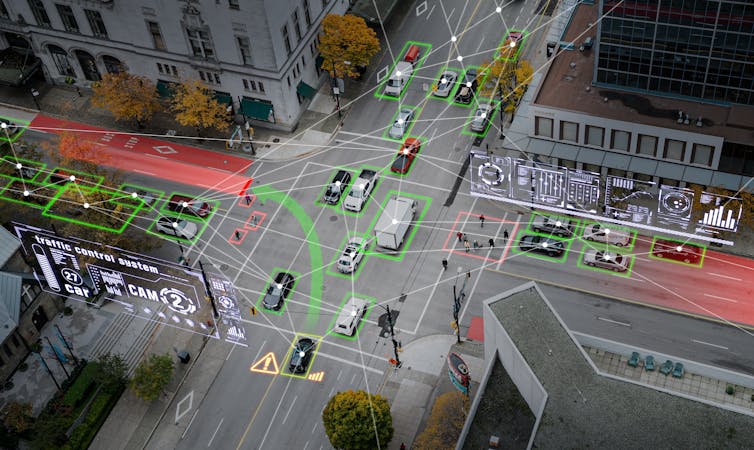
Overhead view of an illustrated, composite image of cars at an urban intersection, with lots of green and red lines and warnings overlaying to depict autonomous driving
Is the future closer than you think? bigshot01/Shutterstock


Projects like the one in Piccadilly circus showcase how AI can be used to make advertising more sensitive to the local context, but the reality of smart advertising in the street is often more basic.

Speaking about a digital billboard in Edinburgh, a resident told us: “That camera just tells the advertising company in London when the screen goes down. So I often feel that some of the advertising has nothing to do with Edinburgh.”


4. In and under the pavement

Sensors embedded in the asphalt can be used to monitor the condition of the road and inform passing vehicles about hazards like potholes. Some upcoming trials will use sensors to detect conflict or near misses in the road.

During the pandemic, sensors installed in sewage systems were used to measure the prevalence of the virus in different parts of the country. Today, scientists are using AI to analyze sensor data from sewage systems to detect cracks or defects.

Many of these street sensors are still in their trial phase, and it is a matter for debate whether they “count” as AI or not.

Some would argue that because sensors and cameras in the street just capture data (that is then analysed by AI), they are not part of AI itself. 

However, as people’s behaviour may be nudged by traffic lights or even wrongly identified based on AI analysis in the street, it seems strange to argue that “AI” does not operate here.


5. In the sky

In some areas, like Coventry city centre, there have been trials with delivery drones. And airborne drone taxis are expected to take off in 2026. The delivery drones are currently only used with human oversight, but are designed to operate autonomously.

When the trial started in 2022, some Coventry residents were sceptical. But whether people approve seems to partly depend on what drones are used for. Hospitals in Warwickshire recently used drones to deliver emergency medical supplies.

A local artist who initially protested against the delivery drones being tested right outside the building where she works, told me that she changed her mind once she heard they are also used for humanitarian purposes.

As this technology becomes more commonplace, it will be important to make sure residents are aware of where it exists – and what it is doing. Our research suggests that when people in the street believe that the technology is not working for them, they are more likely to mistrust it.

One participant pointed out that it is difficult to know what exactly the technology installed in the street is used for, or whether it is even functional: “In my street, we have a semi-functional environmental sensor: someone backed into it with their car, so we’re not sure if it still works.”The Conversation

Noortje Marres, Professor in Science, Technology and Society, University of Warwick


This article is republished from The Conversation under a Creative Commons license. Read the original article.

Copilpt

Microsoft Copilot: The AI Companion That Changed Everything

Microsoft Copilot: The AI Companion That Changed Everything   From a humble chatbot to a cross-platform creative force, Microsoft Copilot ha...